

Your filing system
Clear the clutter
Paperwork starts on the day you were born (your birth certificate) and grows from there! It’s important to find your own system of sorting to keep your documents under control.
A lot of paperwork is now only online and in digital form. This can make things easier or create confusion. You can choose to go paperless, you can stay with paper or you can use both.
In the meantime, take a step back to consider how getting your filing system under control would benefit you by completing the next activity.
Unclutter tip #1
Activity:
What benefits would you receive from getting your filing under control? These categories might help:
- Financial e.g. Less late payment fees
- Time e.g. Less time spent searching for things
- Personal e.g. Less stress
- Social e.g. Don't miss events
System 1: Paperless (online / email inbox)
Goal: Keep your inbox clear. Treat your email inbox as an "in tray", and email folders as your virtual expanding file.
If you’ve nominated to have your bills and paperwork sent to your email, set up your mailbox so it’s ready to receive your mail.
Inbox folders
Have an email folder for every category. For example:
- Car” (CTP, insurance renewal, registration receipts, etc.)
- “House” (insurance renewal, mortgage repayments)
- “Electricity” (bills, and any other communication from your energy provider)
Every time something new happens in your life, for example a new job, create a folder for it. This way every email you get has somewhere to go.
Action your emails
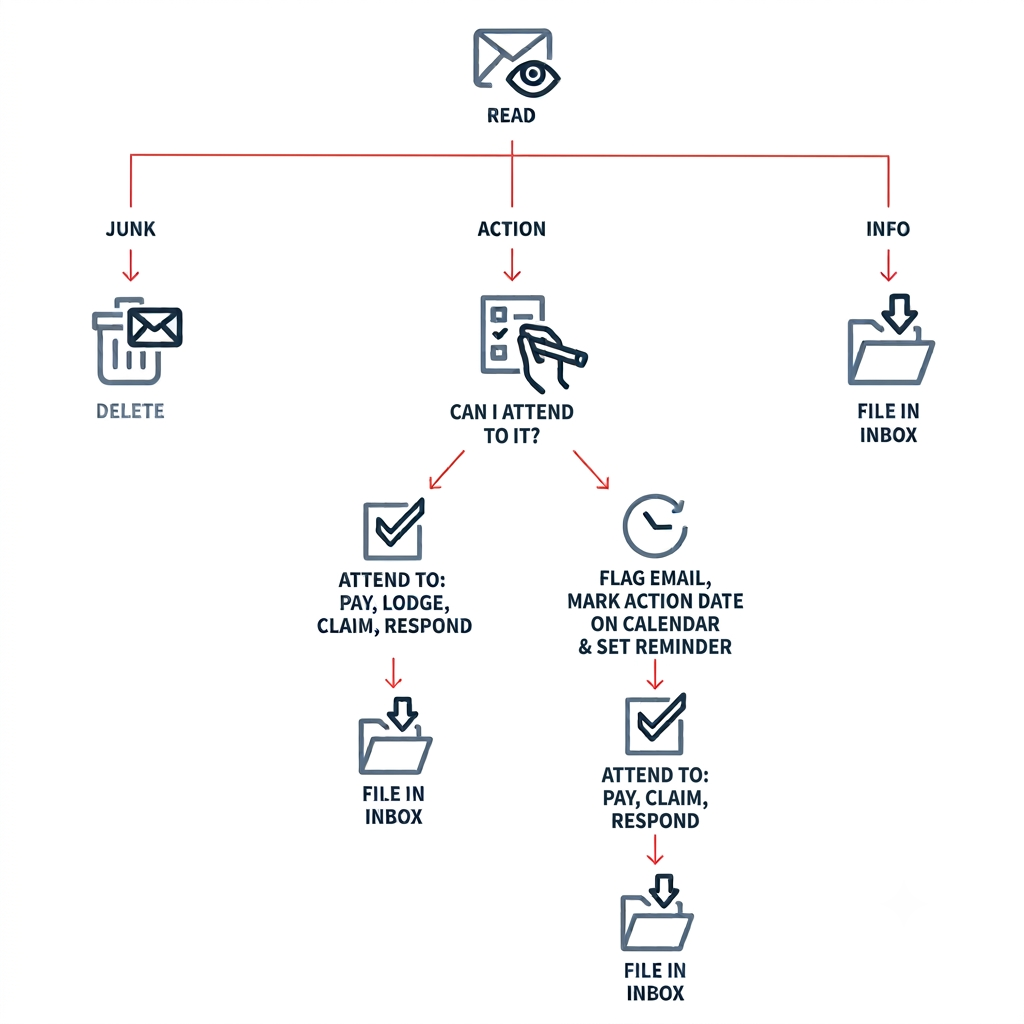
How often to look at emails
With this system, you should only need to look at emails to organise every few days. Turning off your phone/computer notifications helps (including the red badges on the app) so it’s not always getting your attention.
Goal: Go paperless.
- Scan your important documents as they arrive. To keep things simple, you can use your phone with a free scanner app.
- Save each scanned document into its folder.
- Make a plan to safely store and backup your important files. The government website Cyber has lots of excellent information.
Unclutter tip #2
System 2: Paper
Much like the email inbox, we recommend setting up the system before you organise. It is hard to go fully paperless; for example, our birth certificate is an important document that needs to be organised well so we know where to find it.
 Step 1: Organise your new system
Buy an expanding file to file all of the important documents. Usually a new expanding file comes with labels to sort and order or you can just write your own labels.
Like the email filing system, create a section in the file for each topic, such as car, house, or identification documents.

Step 2: Paper clean!
- Gather all the papers from around the house and put them into one pile.
- Sort through each piece. Throw out what you don’t need. File what you do - tax returns, bills and important legal documents.
- Shred or File. File each document that’s left into your new filing system under the relevant categories. Shred the rest!
Step 3: Use a paper tray and your filing system only
If you choose to still receive your bills in the mail, use a paper tray to store the bill until it’s paid. It helps to write down the due date on a second location (other than the bill) such as on a calendar to make sure it gets paid. Once it has been paid, store it away!
Go to Creating new habits to act on the system you'd like to change.