

Subsites
Subsite requirements
All subsites registered on the Salvation Army's Optimisely platform must use the approved colour schemes, block types and conventions set up for all common components. A full list of page blocks and their use can be found here.
In addition, each subsite must display each of the following navigation areas with their mandatory components, unless a specific exception has been made and approved by the management team.
Subsites must have the following elements on all their pages:
- Utility menu
- Horizontal navigation
- Footer
Additionally, subsites must posess the following core pages:
- Homepage / Landing page
- Search page
- 404 page
The following sections outline the mandatory and optional elements of these required areas.
Utility navigation requirements

Mandatory elements:
- Text link to 'The Salvation Army Australia' must be the first element in this navigation.
- Text link to 'Child safety' must be included, though it does not have to be the second item if there is a more important CTA link.
- The 'Search' icon must be present on the right hand side of the utility navigation.
Optional elements:
- All other page links in the utility navigation are optional.
- Icon link to the shop (shopping cart) is optional.
Horizontal navigation requirements

Mandatory elements:
- A logo lock-up for the subsite must be included as the first (left-most) item in the horizontal nav.
Optional elements:
- All other navigation elements (top level or mega-menu navigation) are optional.
- Subsites can include links to other subsites in the main navigation if they are relevant and important to the content.
- CTA buttons, which appear as 1-2 buttons on the right side of the horizontal menu, are optional.
- CTA actions related to donations should use the 'TSA-red' primary button colour, if present.
- For subsites which don't have any donation or shop related pages, a 'TSA-red' button can instead be used for the primary call to action.
Footer requirements
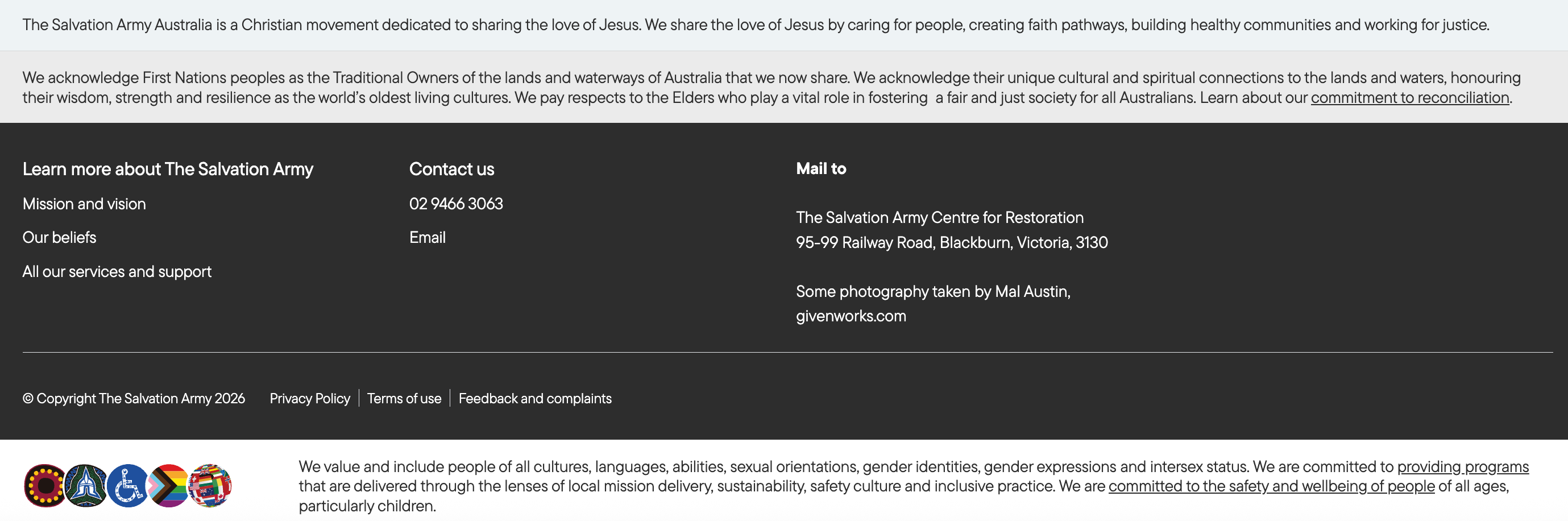
Mandatory elements:
- Footer must display the Salvation Army Australia mission statement.
- Footer must display the acknowledgement of country.
- Must display in the first column of the footer, 'Learn more about The Salvation Army' heading with sublinks for: Mission and vision, Our beliefs, All our services and support.
- Must display copyright statement with: Privacy Policy, Terms of use, Feedback and complaints
- Must display inclusion statement and iconography.
Optional elements:
- Additional links specific to the subsite can be displayed in the main footer area.
- Social links specifically related to the subsite can be displayed in the bottom-right corner from the following platforms: Facebook, YouTube, Instagram.
Core pages
Each subsite must consist of at least one homepage, as well as a search page and a 404 page.
The search page will always prioritise the pages and content on its relevant subsite, but also provides search functionality to all content related on the platform.
The 404 page can use the generic site template.
Subsite examples
The buttons below show a few unique subsite examples with all the required elements present.